Create a Jamendo Licensing Account
To create a Jamendo Licensing account:
- Navigate to Jamendo Licensing
- Click the Login/Sign up button in the top right corner of the screen.
- On the pop-up screen, find and click on the Sign up button:
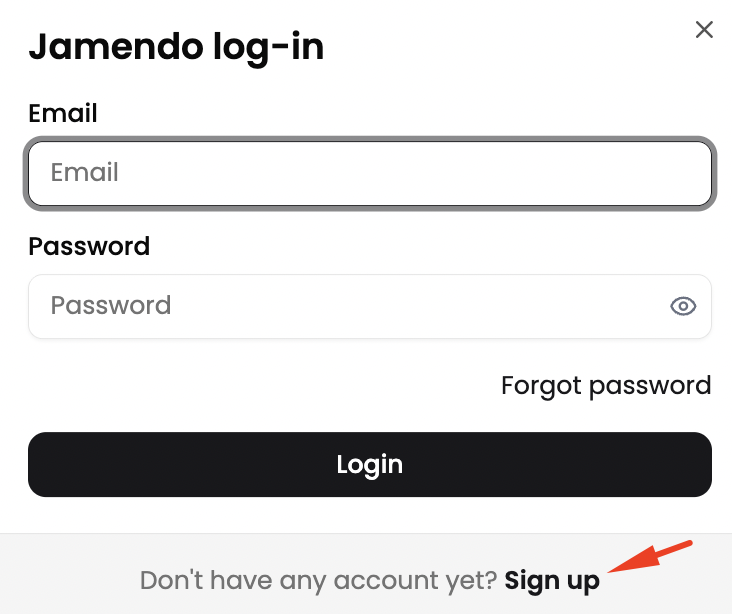
- Enter your email address in the Email field and click Continue with email.
- You will be redirected to the sign-up form, where you’ll need to enter your first name, last name, and password.
- Finally, tick the newsletter checkbox and click Register.
Once you register your account for the first time, you will be automatically logged in to the Jamendo Licensing website.
Logging into your Account
To log into your Jamendo Licensing account:
- Navigate to Jamendo Licensing and click the Login/Sign up button in the top right corner of the screen.
- Enter your email address and password, then click Login.
Reset your Password
To reset your password:
- Go to Jamendo Licensing and click Login/Register in the top-right corner. Then select Forgot password? from the login form.
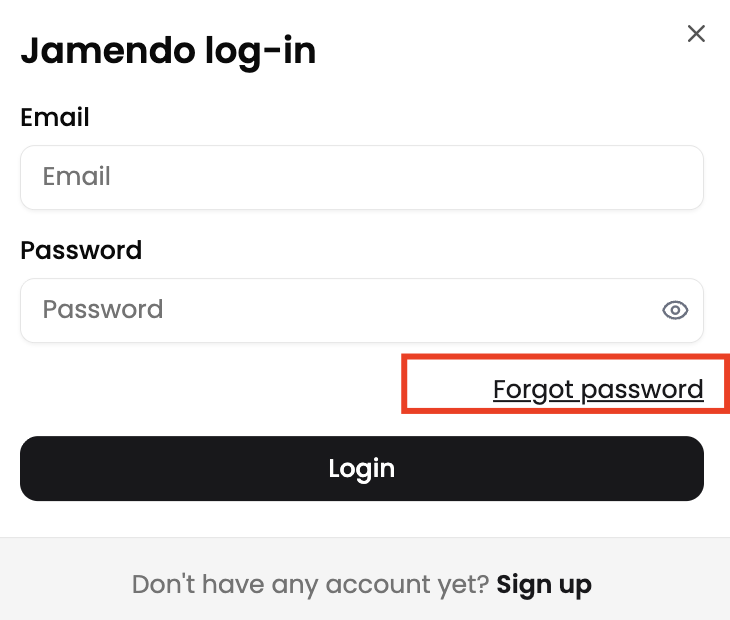
- Enter the email address you used to register your Jamendo account and confirm your request.
- You’ll receive an email containing a link to reset your password and regain access to your account.
- If you don’t receive the email right away, check your spam or junk folder, as it may have been filtered there.
Deactivate your Account
If you'd like to deactivate or delete your Jamendo Licensing account, please contact our customer support team via our contact form.
Be sure to include the following in your request:
- Your first and last name
- A clear message stating that you wish to delete your account
Once we receive your request, we’ll proceed to delete your account and all associated personal data. You’ll receive a confirmation email once the process is complete.
Deleting your account does not automatically cancel any active subscriptions. If you currently have a running subscription, make sure to cancel it first to avoid future charges.