About In-Store Licenses
Transform your establishment's ambiance with our 10 themed In-Store radio stations.
Our In-Store radio stations consist of 10 carefully curated playlists, each featuring at least 250 royalty-free tracks organized by theme. As an In-Store radio subscriber, you will have immediate access to all our stations for commercial use. Updated monthly, each themed radio offers up to 150 hours of unique music to enhance your space.
At an annual price point of 89 EUR, with no hidden charges, you gain access to all 10 radio stations and a license certificate to validate your right to play our music in your establishment. Enjoy a seamless listening experience with no ads or talk shows—just pure, high-quality music.
What’s included with the In-Store license:
- Full access to 10 music genre stations
- Exemption you from any additional royalty payments to your national copyright management organization
- New music added each month
- Access to Hotmix’s 70 stations for personal use
With a Jamendo In-Store subscription, you can enjoy 70 of our specially curated radio stations for personal (non-commercial) use.
Our Radio Stations
On our website, you can sample each radio in our offering and find the one that complements your store perfectly.
To give you an overview of the type of music you can expect with each radio station, we've put together this quick reference guide.
- On The Rocks: A perfect mix of Action Guitar, Indie, Folk, Country, and Blues tunes.
- Cocktail & Dinner Groove: A mix of Soul, Funk, Disco, Pop, Urban, Deep House, Lounge & R&B.
- Cozy Coffee shop: A mix of Acoustic, R&B Soft, Lo-Fi, Electro Soft, and Indie Tunes.
- Shopping Vibes: A mix of curated Pop, Dance, Hits, and Urban Tracks.
- Gentle Luxury: A relaxing mix of Jazz, Deep, Piano Bar, and Nu Jazz.
- Spa Garden: A mix of Zen, Nature Zen, and Ambient Music.
- Cool-And-Calm: A mix of Soft Pop, Acoustic, Soft Electro, and Lo-Fi Beats.
- Just Lounge: A mix of Chillout, Soul, Soft Funk, and Soft Electro Funk.
- Workout : A mix of Hip Hop, Rap, Urban, Electro, Dance Pop, and Pop Rock.
Additionally, one or more radios will be created based on seasonal trends, so stay tuned.
If you need a taste of what we offer, don't forget to check out our demos!
Didn't find what you were looking for? Don't hesitate to contact our sales team to discuss creating a personalized radio station tailored to your needs.
Subscribe to Jamendo In-Store
To subscribe to Jamendo's In-Store Radios:
- Go to the Jamendo Licensing In-Store page
- Click Subscribe.
- In the pop-up window, click Add a location.
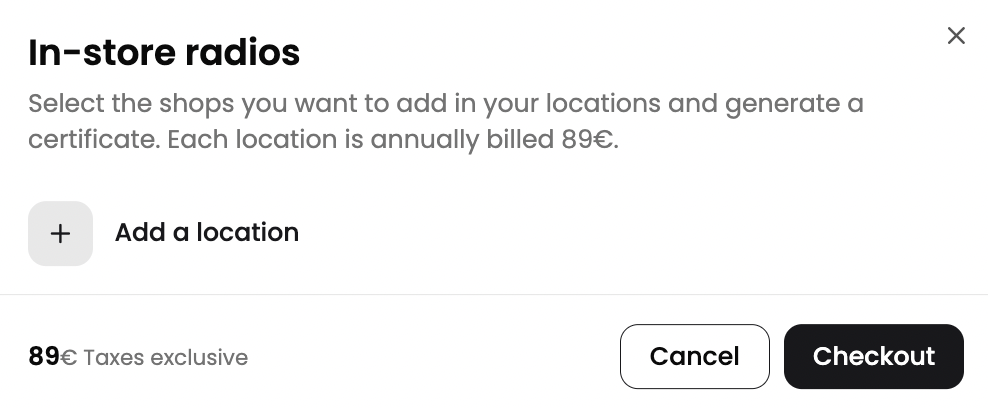
- Then enter the name and address of your establishment. Click Add to save the location.
- Once you’ve added all your locations, select the venue(s) you’d like to license and click Checkout.
- Select your preferred payment method and enter the required payment details.
- Before completing your purchase, check your Billing Address and add your VAT number if applicable. To edit this information, click the pencil icon next to the Billing Address section.
- Review the order summary on the left-hand side of the screen. It shows your selected subscription plan and the total amount due.
- If you have a coupon code, enter it in the Coupon code field and click Enter code to apply it.
Once you’ve entered and reviewed all the required information, click Confirm purchase to complete your order.
An In-Store license certificate is valid for one establishment only. If you need to purchase a license for multiple venues, you can add another location.
Multiple Establishments
For businesses with multiple establishments or stores, you can secure an In-Store license for each individual venue.
If you'd like to purchase an In-Store Radio subscription and get a license to play our In-Store radio in multiple establishments:
- Navigate to the In-Store tab on the Jamendo Licensing website.
- Click Subscribe.
- Click Add a location in the pop-up window.
- Add the establishment's details, including the shop's name and address. Repeat this steps for each of your establishments.
- Select the stores for which you'd like to purchase a In-Store license. The selected stores will be highlighted in blue.
- Finally, click Checkout.
On our website, you can purchase an In-Store license for up to 10 establishments.
If you need an In-Store license for more than 10 establishments, we offer customized packages that include additional benefits, including:
- Bespoke radio stations that align perfectly with your brand's identity
- Jingle integration into our radio programming
- Account Management
- Premium Customer Support
If you're interested in playing our radios in more than 10 different venues, we encourage you to reach out to us directly via our contact form.
What to do After Subscribing
After you've completed your purchase and successfully subscribed to the Jamendo In-Store Radio subscription, you'll need to generate your License Certificate and learn how to play the In-Store radio stations.
Click here to learn more
Understanding your Billing Cycle
When subscribing to Jamendo's In-Store subscription, you are signing up for to an annual subscription plan. This selection defines your billing cycle, meaning you'll be charged annually provided your subscription hasn't been cancelled.
Jamendo In-Store operates on an automatic renewal system, so you don’t need to worry about manually renewing your subscription and license certificate. You’ll be informed in advance before any renewal takes place, and you’ll always have the ability to check the date of your next billing cycle directly in your account settings.
Cancel your In-Store Subscription
To cancel your In-Store subscription:
- Go to the Jamendo Licensing website and log in to your account.
- Choose In-Store Radios in your account view in the top-right corner.
- Find the location for which you want to cancel the subscription and click the three-dot menu next to it.
- Select Cancel Subscription.
- Your automatic renewal for the In-Store license will be canceled. However, your license will remain valid until the end of the current subscription period.
Deleting your account does not automatically cancel any active subscriptions. Follow the steps above or contact us if you'd like to cancel your In-Store Radio subscription.